Accounting Payment Gatway Reconciliation
Problem Statement
Businesses using Pelcro need an easier way to reconcile charges, refunds, and disputes with their payment processor. Today, Pelcro’s reports don’t match the processor’s data in a clean, one-to-one way, so teams have to manually filter and adjust numbers to line everything up. This slows down reconciliation, introduces errors, and creates inconsistent financial records.
User Story
As a Finance user,
I want a simple monthly report in Pelcro showing total charges, refunds, and disputes
so that I can easily validate all Pelcro transactions against the processor monthly summary with 100% matching accuracy.
Definition of Done
The feature is complete when:
A new report is added under Accounting Reports → Reconciliation.
The report includes a monthly selector (YYYY-MM format).
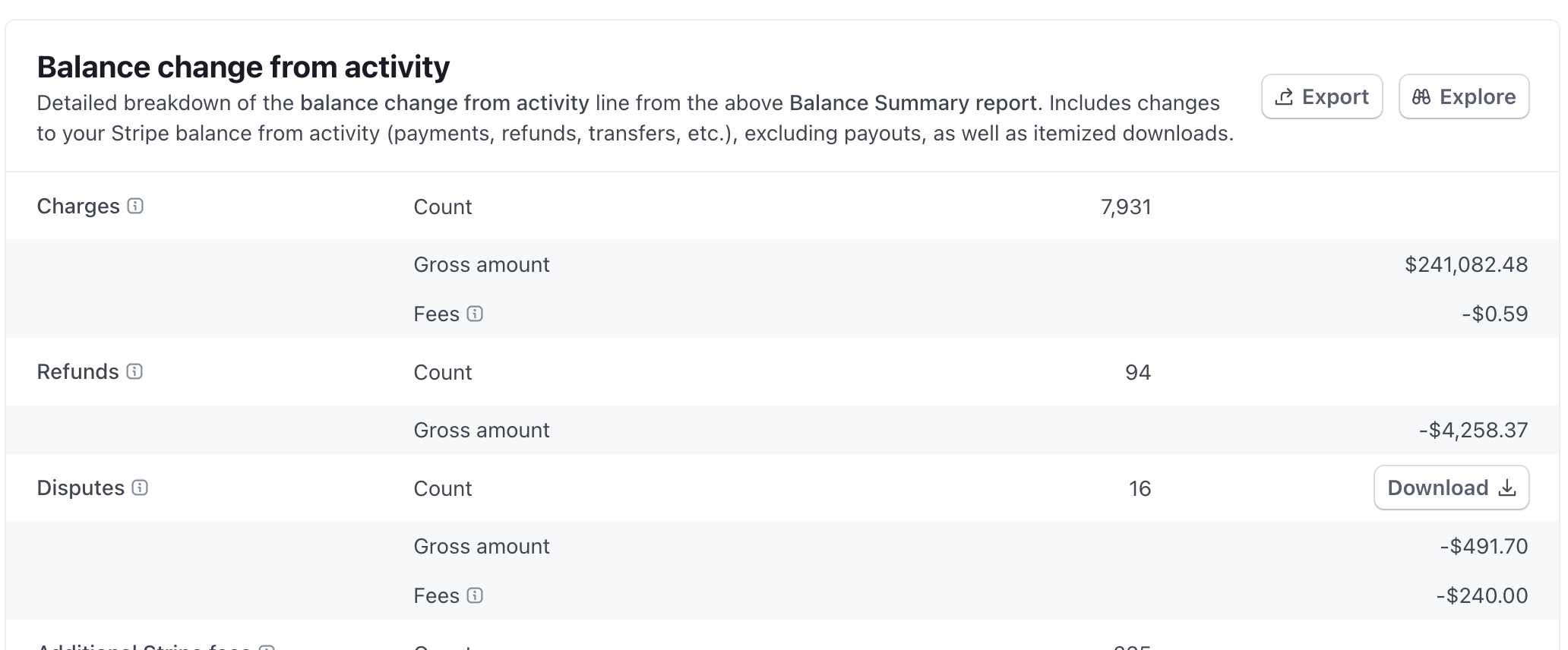
Create a table view similar to the screenshot attached.
The table displays three rows:
Payments
Refunds
Disputes
Each row contains the following columns:
Online total
Offline total
Total
Export button
The Export button downloads the related report with its current data points (payments, refunds, disputes).
Table layout is simple and structured (non-graphical, no revenue recognition logic).
Online vs. offline logic must align with Pelcro’s existing source-of-payment classification.
Export file (CSV) includes all displayed fields, grouped by month.
Log in to comment and vote
Comments3
Rana Haleem
Nov 18, 2025
•Merged request
•2 votes
Add disputed Flag to Refund Records in Accounting Exports
🔍 Problem Statement
As an admin or client, I experience difficulty identifying which refunds are caused by payment disputes (chargebacks), which results in a manual reconciliation process when reviewing accounting exports. Currently, all refund records appear identical, making it impossible to differentiate standard refunds from dispute-driven refunds.
💡 User Story
As an admin, I want each refund record in the accounting exports to include a flag (e.g.,
disputed) so that I can easily distinguish refunds triggered by disputes from normal refunds.As a client, I want to automate my financial reconciliation by filtering dispute-related refunds directly from the exported file.
🎯 Definition of Done (DoD)
✔ Given a refund tied to a disputed charge, when it is included in the accounting exports, then the export should display a field
disputed = true.✔ Given a normal refund not tied to a disputed charge, when it appears in the export, then the field should display
disputed = false.✔ This change will impact the Pelcro Platform (Exports Module), specifically:
Refund exports
Accounting exports
✔ This solution will include the following limitations:
The flag applies only to future exports after the feature’s release.
This flag will not be exposed via the API or SDK.
Michael Ghattas
Nov 11, 2025
Questions:
Is there a disputed_at date?
Not at the moment
Should we implement a disputes row in the accounting report?
Michael Ghattas
Nov 18, 2025
•Merged request
•3 votes
Disputes Management
🔍 Problem Statement
Pelcro does not provide a centralised view of payment disputes (chargebacks). Admins must monitor disputes through individual payment gateway dashboards, which fragments the workflow and delays response times — risking increased chargeback losses.
💡 User Story
As a Pelcro admin, I want a Disputes Management section in the Pelcro dashboard, so that I can view, track, and respond to chargebacks from a single place without switching to gateway-specific portals.
🎯 Definition of Done (DoD)
A feature is done when:
✔️ Given a dispute filed against a payment, when the admin opens the Disputes section, then they see the dispute details (amount, reason, deadline), can upload evidence, and track resolution status — all within the Pelcro dashboard.